Best TikTok Profile & Video Data Scrapers in 2026
A comprehensive review of the best tools to extract TikTok videos, comments, profiles, and trending hashtags for marketing research.
As an Apify affiliate, we may earn a commission from qualifying purchases made through our links, at no extra cost to you. We only recommend tools we believe in.
The best TikTok scraper in 2026 is Apify’s TikTok Scraper (clockworks/tiktok-scraper). It extracts video metadata, profile statistics, hashtag feeds, and comments without getting blocked, outputs clean JSON/CSV/Excel, and requires zero infrastructure. For most marketing and research use cases it outperforms browser extensions and DIY Python scripts on every dimension that matters: reliability, output completeness, and total cost of ownership.
TikTok’s algorithm moves fast. View counts double overnight. Hashtags go from niche to mainstream in 72 hours. If you are doing influencer marketing, competitive research, academic trend analysis, or brand monitoring, you need structured data — not screenshots. This review covers every realistic tool category, lays out an honest comparison table, and tells you exactly which option to pick based on your budget and technical context.
Why Is TikTok So Hard to Scrape?
Before diving into tools, it helps to understand what makes TikTok uniquely difficult compared to other social platforms.
TikTok does not offer a public data API for third-party developers in the way Twitter (X) used to. Its Research API exists but is restricted to vetted academic institutions and has strict rate limits. That leaves most businesses and researchers relying on either unofficial scraping or licensed data providers.
On the anti-bot side, TikTok uses browser fingerprinting, device signature checks, JavaScript challenges, and aggressive IP-level rate limiting. A plain requests-based Python script will get a 403 within minutes. Even headless browsers running Playwright or Puppeteer are identified quickly unless you layer in stealth patches and residential proxies — and TikTok updates its detection logic frequently enough that those patches break on a weekly cadence.
The practical result: maintaining a TikTok scraper in-house is a full-time engineering problem, not a one-time build. That reality shapes every recommendation below.
Which TikTok Scraper Is Most Reliable in 2026?
For production use, Apify’s TikTok Scraper is the most reliable option available without a formal data licensing agreement with TikTok itself. Here is why:
Proxy infrastructure is already solved. Apify runs a large residential proxy pool that rotates IPs on every request. You never deal with CAPTCHAs, cooldown periods, or IP bans because the scraper handles it transparently.
It stays maintained. TikTok changes its internal API structure and DOM layout constantly. The clockworks/tiktok-scraper actor on Apify is actively maintained — when TikTok breaks something, the fix reaches you without you touching any code.
Scheduled runs work. You can set the scraper to run on a daily cron schedule from the Apify console and have fresh data land in your dataset automatically. For competitive monitoring or trend tracking, this is essential.
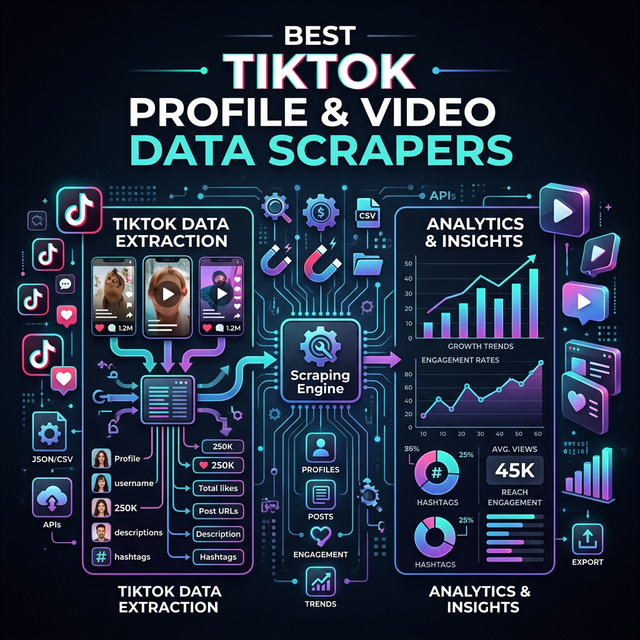
Output is production-ready. Each video record includes: id, desc, createTime, authorMeta (follower count, verified status, avatar URL), musicMeta, covers, webVideoUrl, videoUrl (direct play link), diggCount (likes), shareCount, playCount, commentCount, and full hashtags array. You get everything you would need for a proper dataset, not just surface-level metrics.
What Can You Actually Scrape from TikTok?
Depending on which scraper you use and how you configure it, you can extract:
- Profile data — username, display name, bio, follower/following counts, video count, verified badge, avatar URL
- Video metadata — title/description, hashtags, music track, view/like/comment/share counts, direct video URL, thumbnail URL, upload timestamp
- Hashtag feeds — all videos associated with a given hashtag, sorted by recency or popularity
- Search results — videos matching a keyword query
- Comments — individual comments per video, including commenter username, like count on the comment, and timestamp
- Trending content — regional trending feeds (availability varies by region and anti-bot climate)
Not everything is always available. Comment extraction is the most fragile — TikTok’s comment API endpoints change frequently. Video metadata and profile statistics are the most stable extraction targets.
Feature Comparison: Apify vs TokBackup vs Python DIY
Here is a straight comparison of the three main approaches:
| Feature | Apify TikTok Scraper | TokBackup (Browser Extension) | Python / Playwright DIY |
|---|---|---|---|
| Setup time | 5 minutes (no code) | 2 minutes | Days to weeks |
| Bulk extraction | Yes (thousands of records) | Limited (~20-50 videos) | Yes, if maintained |
| Profile scraping | Yes | Partial | Yes |
| Hashtag feeds | Yes | No | Yes |
| Comment extraction | Yes | No | Fragile |
| Residential proxies included | Yes | No | Manual setup required |
| Blocks / CAPTCHAs | Handled automatically | Frequent at scale | Frequent, breaks weekly |
| Output formats | JSON, CSV, Excel, XML | CSV only | Whatever you code |
| Scheduled / automated runs | Yes (Apify scheduler) | No | Manual cron + hosting |
| Maintenance required | None (Apify maintains) | None (limited features) | High (weekly TikTok changes) |
| Pricing | Pay-per-result or subscription | Free / freemium | Engineering time + proxy costs |
| Best for | Marketing teams, researchers, agencies | Personal archiving only | Engineering teams with capacity |
The gap between browser extensions and cloud scrapers is stark once you need more than a few dozen videos. Extensions are fine for backing up your own content. For any kind of research or business intelligence, they are the wrong tool.
How Do Browser Extensions Compare to Cloud Scrapers?
Browser extensions like TokBackup, TikTok Downloader, or various Chrome store utilities work by injecting JavaScript into TikTok pages as you browse them. They capture video URLs and metadata visible in the current page’s network requests.
The fundamental limitation is that they require a human to be actively browsing. They cannot run overnight, cannot scale to thousands of profiles, and cannot be scheduled. Most max out at 20-50 videos before rate limiting or session issues intervene. They also have no programmatic output — you get a CSV dump at best, with no API to query.
For personal use (archiving your own TikTok videos, saving bookmarks), they are convenient. For any business use case, they are a dead end.
Is Building a Custom Python Scraper Worth It?
For a senior developer, building a basic TikTok scraper with Playwright is achievable. The open-source playwright-stealth library, combined with a residential proxy service like Bright Data or Oxylabs, can get you past basic fingerprinting checks.
The problem is the maintenance burden. TikTok’s anti-bot engineers update detection signatures frequently. Breaking changes that kill your scraper happen on a scale of days to weeks, not months. Each fix requires:
- Identifying which fingerprint check or API endpoint changed
- Updating Playwright stealth patches
- Validating the scraper against live TikTok pages
- Redeploying your scraping infrastructure
If your team has the bandwidth and the scraping is mission-critical enough to justify a full-time maintainer, building in-house gives you maximum control. For most teams, the economics favor a managed solution. Apify’s pricing starts at $5/month for light usage — far less than a single engineering hour.
See our guide on TikTok scraping for viral marketing research for a deeper look at what data points drive actionable insights.
What Does Apify’s TikTok Scraper Cost?
Apify operates on a compute-unit pricing model. Running the TikTok Scraper costs approximately:
- ~1,000 video records: roughly $0.50–$1.50 depending on whether you include comments
- ~10,000 video records: roughly $5–$15
- Monthly subscription (Starter plan, $29/month): includes enough compute units for tens of thousands of records per month, plus full access to all other Apify actors
For infrequent one-off research pulls, the pay-as-you-go model works well. For teams running regular competitive monitoring or influencer audits, a monthly subscription typically costs less than building and hosting equivalent infrastructure yourself.
All Apify actors — including the TikTok Scraper — are accessible via API, so you can trigger runs programmatically and pipe results directly into your data warehouse or dashboard.
How Do I Use the Apify TikTok Scraper?
The quickest path to data:
- Go to the TikTok Scraper detail page and click “Try for free”
- In the actor input form, paste one or more TikTok profile URLs, hashtag URLs, or video URLs
- Set your desired result limit (e.g., 500 videos)
- Click “Start” — the run completes in the cloud, no local setup needed
- Download results as JSON, CSV, or Excel from the dataset tab
For programmatic use, the Apify API lets you trigger runs via a POST request and poll for results, or use webhooks to receive a notification when a dataset is ready. The JavaScript and Python SDKs make integration straightforward.
Which TikTok Scraper Should You Choose?
For most people reading this, the answer is Apify’s TikTok Scraper. Here is the decision matrix:
- You need reliable bulk data without writing code → Apify, no question
- You want to archive your own 30 TikTok videos → A browser extension works fine
- You have a dedicated data engineering team and specific custom requirements → Python/Playwright DIY, but budget for ongoing maintenance
- You need comment-level sentiment analysis at scale → Apify with comment extraction enabled, or explore licensed data partnerships for very high volumes
Browse the full comparison of social media scrapers if you are also evaluating tools for Instagram, YouTube, or LinkedIn alongside TikTok.
Verdict
TikTok is the hardest mainstream platform to scrape, and that is not changing. Its anti-bot infrastructure is sophisticated and actively maintained. The only realistic options for production data extraction are cloud-based tools with built-in proxy rotation and ongoing maintenance, or expensive licensed data partnerships.
For the vast majority of marketers, researchers, and agencies, Apify’s TikTok Scraper (clockworks/tiktok-scraper) hits the right balance: it works reliably, outputs clean structured data, costs less than an hour of engineering time per month, and requires zero maintenance on your end. Start there. If you eventually hit volume limits or need data points the actor does not cover, you will have enough real-world context by then to make a more informed decision about custom infrastructure.
Related Resources
Frequently Asked Questions
Will TikTok rate-limit or block my scraper?
What output formats can I get from TikTok scrapers?
What are the main use cases for scraping TikTok data?
🛠️ Recommended Tools
TikTok Data Extractor
Extract TikTok videos, profiles, and engagement metrics to analyze trends and content performance. Export viral-video datasets to Excel or JSON.
TikTok Scraper
Extract TikTok videos, user profiles, hashtags, and music data. Crucial for understanding short-form video trends and viral content.
Tags
ParseFlow
Web Scraping & Automation Studio
Years of hands-on experience building and maintaining web scrapers. We publish real, actively-used tools on the Apify Store under the Website Harvester brand — including our Articles Extractor actor — alongside curating and reviewing the broader Apify ecosystem here on ParseFlow.
Related Articles
Apify Pricing Explained 2026: Cost, Compute Units & Is It Free?
A complete guide to Apify's 2026 pricing model. Understand Compute Units (CUs), proxy costs, and how to start scraping the web for free.
Apify vs Bright Data: Which Web Scraper is Better in 2026?
An honest comparison between Apify and Bright Data. Which platform offers better scraping capabilities, proxies, and pricing?
Apify vs Octoparse: Which No-Code Scraper Wins in 2026?
Comparing Apify and Octoparse for no-code web scraping. Learn the differences in usability, scale, cloud execution, and pricing.