Apify vs Octoparse: Which No-Code Scraper Wins in 2026?
Comparing Apify and Octoparse for no-code web scraping. Learn the differences in usability, scale, cloud execution, and pricing.
As an Apify affiliate, we may earn a commission from qualifying purchases made through our links, at no extra cost to you. We only recommend tools we believe in.
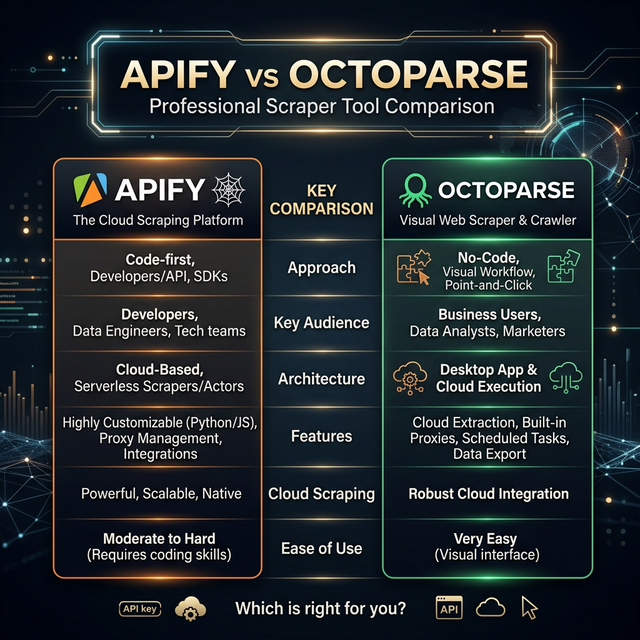
Apify vs Octoparse in 2026 comes down to this: choose Apify when your target is a popular, well-trafficked site — social media, maps, e-commerce, real estate, job boards — because someone has already built, tested, and is actively maintaining a scraper for it in Apify’s marketplace. Choose Octoparse when you need to extract data from a niche or obscure website that no Actor developer has covered, and you have the patience to build and maintain the workflow yourself.
Both tools call themselves no-code. They mean very different things by it, and the difference has compounding consequences over months of use.
The Core Architecture Difference
Octoparse’s model is: you build the scraper. Download the desktop application (Windows or Mac), open your target URL in the built-in browser, point and click on the elements you want to extract, configure pagination and scroll behavior, then deploy to Octoparse’s cloud when ready to scale. For simple, stable websites this process takes 15–30 minutes. The interface is genuinely beginner-friendly — no CSS selectors, XPath, or code required for straightforward jobs.
Apify’s model is: someone already built the scraper. Instead of building from scratch, you browse the Apify Store — a marketplace of 19,000+ pre-built “Actors” (Apify’s term for scraping tools and automations). Find the Actor that matches your target. Fill in the input form: a keyword, a list of URLs, a geographic area, a date range. Click Run. Receive structured output in JSON, CSV, or Excel. Done.
The Actors are built by independent developers or by Apify’s own team, and they compete for users based on reliability and data quality. A popular Actor targeting Amazon product pages, for example, might have dozens of alternatives — each rated and reviewed by thousands of users who have tested it against Amazon’s bot detection. You pick the one with the best reputation and run it.
This architecture difference is not cosmetic. It determines how each tool handles the hardest scraping problems: aggressive bot detection, JavaScript-heavy single-page applications, frequent site redesigns, and high-volume parallel extraction. Octoparse’s visual builder is a tool for creating scrapers. Apify’s marketplace is a tool for running scrapers that already exist and are already working.
Feature Comparison Table
| Feature | Apify | Octoparse |
|---|---|---|
| Approach | Pre-built Actor marketplace + custom Actor SDK | Visual point-and-click workflow builder |
| Platform | 100% cloud-native, browser-based | Desktop app (Mac/Windows) + optional cloud execution |
| Free tier | Yes — $5 credit/month, no card required | Free desktop version (10-row export limit per table) |
| Scalability | Virtually unlimited — billed by compute units, no concurrency cap | Capped by plan’s cloud task slots |
| Pre-built scrapers | 19,000+ maintained Actors in the marketplace | Template library (limited, community-maintained) |
| Maintenance | Handled by the Actor’s developer | Your full responsibility |
| JavaScript rendering | Full Playwright/Puppeteer Chromium, purpose-built cloud infra | Built-in Chromium browser (runs on your desktop or limited cloud credits) |
| Proxy management | Built-in residential + datacenter pool, billed per use | Manual proxy import or paid add-on subscription |
| API access | Full REST API + webhooks on all paid plans | API available on Team plan and above |
| Scheduling | Built-in cron scheduling on all paid plans | Available on Standard plan and above |
| Output formats | JSON, CSV, Excel, XML, JSONL, HTML, RSS | JSON, CSV, Excel, HTML, TXT, Google Sheets |
| Integrations | Zapier, Make, webhooks, direct API, MCP server | Zapier, Google Sheets, databases (paid plans) |
| Team collaboration | Organizations with role-based access control | Team plan with shared task access |
| Starting paid price | $29/month (Starter) | $75/month (Standard) |
| Mid-tier price | $199/month (Scale) | $149/month (Professional) |
| Top listed price | $999/month (Business) | $209/month (Enterprise) |
Several rows in that table deserve more explanation than a cell can provide.
Proxy management is where Apify’s integrated approach matters most. Octoparse at higher scale requires you to source your own proxies or buy a proxy add-on subscription separate from your Octoparse plan — typically adding $50–$150/month for anything beyond basic datacenter IPs. Apify’s residential and datacenter proxy pool is integrated into the platform billing system: you pay for what you use as part of your compute credit budget, not as a separate line item. This makes cost comparison at face value misleading — Octoparse’s listed plan prices do not include proxy costs for serious scraping workloads.
Scalability is the other significant gap. Octoparse plans define “cloud task slots” — the number of scrapers you can run simultaneously. On the Standard plan that is 10 concurrent cloud tasks. On Professional it is 40. Apify bills by compute units (a time-and-memory product) with no artificial concurrency ceiling. If your budget covers it, you can run 500 parallel jobs simultaneously. There is no slot limit to upgrade around.
Ease of Use — Who Actually Wins?
Octoparse genuinely wins on initial setup for users who have never scraped before. Opening a browser, clicking on what you want, and clicking Export is faster than learning what an Actor is, finding the right one, reading its input documentation, and configuring the input form.
That advantage erodes quickly.
For the second scraping job, Apify is faster — you already know how the Store works, and most targets already have an Actor. For the tenth job, the gap is decisive. Apify users are running pre-built tools at that point; Octoparse users are building and debugging workflows.
The more important ease-of-use question is not “how easy is the first run” but “how easy is the tenth run six months from now when three of your scrapers have broken because the target sites updated their HTML.” On that question, Apify wins clearly — because the answer is “they probably fixed themselves without you noticing.”
Scalability and Cloud Execution
Octoparse’s desktop-first architecture creates a ceiling on scalability that becomes visible quickly. Running a workflow locally uses your machine’s CPU, RAM, and network connection. Running it in Octoparse’s cloud is better, but you are still bound by task slot limits that require plan upgrades to expand.
Apify was built cloud-first. The compute infrastructure scales horizontally — spinning up additional browser instances in parallel is a configuration choice, not a plan upgrade. For teams scraping millions of records per month, or for any workflow that needs to complete within a time window (weekly market reports, daily price monitoring, real-time lead feeds), Apify’s horizontal scaling is decisive.
The practical implication: an Octoparse Professional plan user who needs to scrape 100,000 records on a deadline must either wait for sequential task completion within their 40-slot limit, or upgrade to Enterprise. An Apify Scale plan user sets a higher concurrency parameter and the job finishes proportionally faster without any plan change.
Maintenance: The Hidden Cost
This is the dimension that most tool comparison articles ignore, and it is the one that matters most over a 12-month horizon.
Websites change. Product teams redesign interfaces. JavaScript frameworks get upgraded. Anti-bot systems get more aggressive. CSS class names get minified and rotated. Every one of these events can break a scraper that targets the affected site by selector or XPath pattern.
With Octoparse, every broken scraper is your problem to fix. You open the desktop app, reload the target URL, diagnose which selectors stopped matching, repair the workflow, re-test, and re-deploy. If you maintain 15 active scrapers and three major sites redesign in the same quarter — which happens regularly after product launch seasons — that is a significant unplanned workload.
With Apify, popular Actors are maintained by their developers as a condition of their marketplace presence. When Amazon changes its product page DOM, the Amazon Actor’s developer pushes a fix, often within hours of the change going live. Users with scheduled runs see no interruption. Popular Actors on the Store have visible maintenance histories: last-updated timestamps, user reviews flagging reliability issues, and active discussion threads where you can see how quickly the developer responds to breakage reports.
This is a structural advantage, not just a feature difference. Maintenance is a person’s job, and Apify’s marketplace model delegates that job to the person who knows the scraper best — its author — rather than to you.
Pricing Comparison
Apify pricing is usage-based on top of plan tiers:
- Free: $5 credit/month, 1 concurrent run, community support, no card required
- Starter: $29/month includes $29 in platform credit, 3 concurrent runs, scheduled runs, email support
- Scale: $199/month includes $199 credit, 10 concurrent runs, priority support
- Business: $999/month includes $999 credit, 50 concurrent runs, dedicated support, SLA
Platform credit covers compute time, proxy usage, and storage. A typical web scraping run for 10,000 records costs $0.50–$3.00 in credit depending on whether browser rendering and proxy rotation are required. For a deeper breakdown see the Apify pricing guide.
Octoparse pricing is seat and task-slot based:
- Standard: $75/month — 10 cloud task slots, 2 local tasks, basic IP rotation
- Professional: $149/month — 40 cloud task slots, 10 local tasks, scheduled cloud runs, advanced proxy
- Enterprise: $209/month — unlimited cloud task slots, priority support, dedicated account manager
The Enterprise comparison looks favorable for Octoparse ($209 vs $999 for Apify Business). That gap narrows substantially once proxy costs are added. Professional-grade proxy access for high-volume scraping on Octoparse typically adds $50–$200/month on top of the plan price, depending on data volume and geo-targeting requirements. Apify’s proxy costs are absorbed into the platform credit system.
For teams scraping between 10,000 and 100,000 records per month, real total cost of ownership is roughly comparable between the two platforms. Above that volume, Apify’s compute-unit billing generally wins. Below that volume, both platforms are affordable, and the decision comes down to architecture preference and maintenance tolerance.
When to Choose Octoparse
Octoparse is the better choice in these specific scenarios:
- Niche or obscure websites that no Actor developer has targeted. A regional procurement portal, a trade association membership directory, a local government database — these are often too small to attract an Actor developer, but Octoparse’s visual builder can extract them today.
- Strict one-time exports where you need data from a site once and never again. Building a visual workflow is fast for simple structures, and there is no ongoing maintenance concern when the job is genuinely finished.
- On-premise data security requirements. Octoparse’s desktop app can run entirely locally without routing data through a cloud provider, which matters for certain compliance environments.
- Teams committed to building custom scrapers who prefer a visual interface over writing JavaScript or Python code.
When to Choose Apify
Apify is the stronger default for most production scraping use cases:
- Popular site targets — if your target site has meaningful web traffic, there is likely an Actor for it. The web-scraper and website-content-crawler Actors cover broad use cases; the Store has specialized Actors for Google Maps, LinkedIn, Amazon, Instagram, TikTok, Zillow, and hundreds of other specific targets.
- High-volume or parallel scraping without hitting concurrency ceilings.
- Recurring automated workflows where you cannot afford downtime when target sites update.
- API integration requirements — Apify’s REST API and webhooks are available on all paid plans and are thoroughly documented.
- Budget-conscious starters — the free tier and $29 Starter plan beat Octoparse’s $75 entry point before proxy costs are factored in.
- Teams without developer bandwidth to debug broken selectors after site redesigns.
If your specific use case requires something custom-built on top of Apify’s infrastructure — a scraper for a proprietary data source, enrichment logic tied to internal systems, or multi-step automation beyond what existing Actors support — the managed extraction service is worth evaluating before committing engineering resources to building it yourself.
Verdict
For most business users in 2026, Apify is the better default choice. It costs less to start, requires no software installation, offloads scraper maintenance to the people who built each tool, scales without artificial concurrency limits, and covers the overwhelming majority of common scraping targets with pre-built, actively maintained Actors.
Octoparse remains a legitimate option when your target is genuinely obscure — a site small enough that no Actor developer has bothered to support it — or when your extraction is truly one-off and you want a visual workflow builder with no cloud dependency.
If you are currently using Octoparse and spending meaningful time each month fixing broken selectors, that maintenance time has a real cost. Apify’s free tier requires no credit card and lets you run the equivalent Actor for your most painful scrapers in minutes. The comparison is worth making empirically rather than theoretically.
Browse the comparisons hub to see how both tools stack up against the rest of the market — Bright Data, ScraperAPI, Playwright-based custom stacks, and others.
Frequently Asked Questions
What happens when the target website changes its layout?
Does Octoparse handle JavaScript-heavy sites?
Is there a free version of Apify?
🛠️ Recommended Tools
Web Scraper
Crawl any website in a real browser and extract structured data with custom JavaScript. Handle dynamic pages and export to 7 formats.
Website Content Crawler
Advanced website crawler extracting clean, structured content in Markdown, JSON, or plain text for AI and LLM applications.
Tags
ParseFlow
Web Scraping & Automation Studio
Years of hands-on experience building and maintaining web scrapers. We publish real, actively-used tools on the Apify Store under the Website Harvester brand — including our Articles Extractor actor — alongside curating and reviewing the broader Apify ecosystem here on ParseFlow.
Related Articles
Apify MCP Server: Give Your AI Agent Access to 70,000+ Web Scrapers
How to connect Claude, GPT-4, and other AI agents to Apify's MCP server and give them access to 70,000+ real-time web scrapers — in under 10 minutes.
Apify Pricing Explained 2026: Cost, Compute Units & Is It Free?
A complete guide to Apify's 2026 pricing model. Understand Compute Units (CUs), proxy costs, and how to start scraping the web for free.
Apify vs Bright Data: Which Web Scraper is Better in 2026?
An honest comparison between Apify and Bright Data. Which platform offers better scraping capabilities, proxies, and pricing?